What Internet Speed Do You Need?
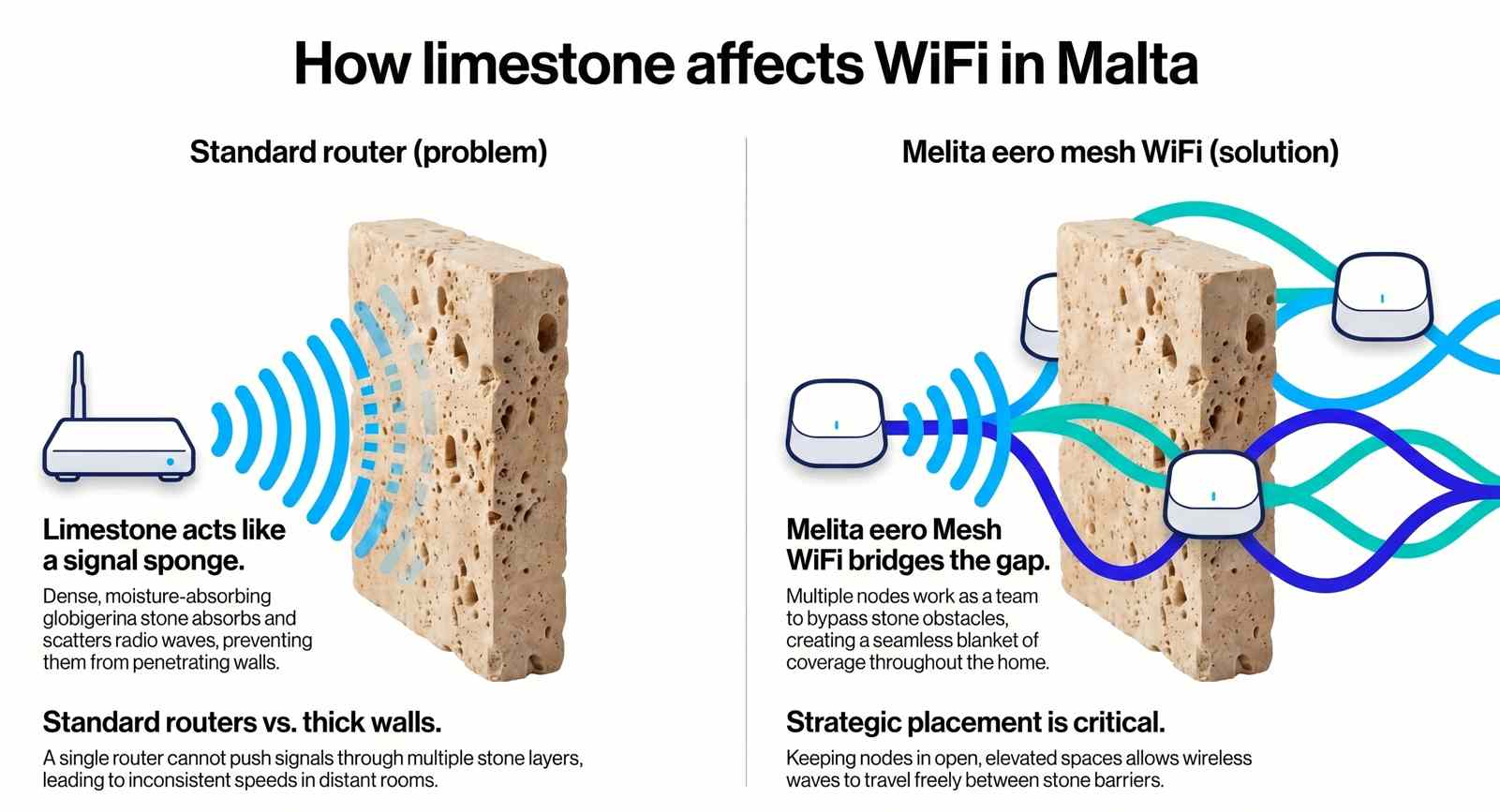
Not every Maltese household needs the same internet speed. The right broadband package depends on how many people are online at the same time, what they are doing, and how WiFi performs throughout the property. Streaming, gaming, remote working, video calls, smart home devices and large downloads all place different demands on a network. In Malta, thick limestone walls can also affect wireless performance, making WiFi coverage just as important as the broadband speed itself.
This guide explains what you can realistically expect from each Melita speed tier, from 250 Mbps through to 2.5 Gbps, and how to get the best performance from your connection.
Understanding Broadband Performance
Several factors affect internet performance regardless of which package you choose. Ethernet connections provide the most accurate representation of your broadband speed, while WiFi performance varies depending on distance, interference and building construction.
In many Maltese homes, limestone walls reduce wireless signal strength between rooms and floors. Device capability also plays an important role, as older phones, tablets and laptops may not support modern WiFi standards or higher broadband speeds. Router and mesh node placement can have a significant impact on coverage and overall performance.
It is also important to distinguish between speed and latency. Activities such as gaming and video calls rely heavily on connection stability and response times, not simply download speed.
250 Mbps – Everyday Internet
The 250 Mbps package is designed for smaller households, couples and individuals who primarily browse the web, stream content, use social media and work from home occasionally. It typically supports between five and ten connected devices without difficulty.
In a typical Maltese apartment or small home, HD streaming, video calls and general browsing perform well when devices are close to the router. Through one or two limestone walls, wireless speeds will naturally decrease. Adding a centrally positioned eero mesh node can improve coverage and provide a more consistent experience throughout the property.
A single 4K stream works comfortably on this package, although households combining multiple high-bandwidth activities at the same time may benefit from a faster tier.
500 Mbps – The Family All-Rounder
The 500 Mbps package is well suited to families and households with multiple active users. It comfortably supports between ten and fifteen connected devices, including smart TVs, gaming consoles, laptops and smartphones.
In medium-sized homes, one or two eero mesh nodes generally provide strong coverage throughout the property. Multiple streams, online gaming and cloud applications can operate simultaneously without placing significant strain on the connection. Ethernet connections remain the preferred option for gaming consoles and workstations where maximum consistency is required.
For many households, 500 Mbps provides an effective balance between performance, capacity and value.
750 Mbps – Heavy Use and Multitasking
The 750 Mbps package is intended for busy households where several people regularly stream, game, work remotely and download large files at the same time. It is typically suitable for between fifteen and twenty connected devices.
Larger homes often benefit from two or three strategically placed eero nodes to maintain strong WiFi coverage. When mesh nodes are positioned correctly, streaming, video conferencing and downloads can occur simultaneously with minimal impact on performance. Large files also transfer significantly faster compared to lower speed tiers.
Households with frequent cloud backups, media transfers or multiple remote workers often find this package provides additional flexibility.
1 Gbps – High-Demand Connected Homes
The 1 Gbps package is designed for larger households, smart homes, content creators, remote workers and users with demanding connectivity requirements. It typically supports twenty to thirty connected devices operating at the same time.
Gigabit broadband provides substantial capacity for simultaneous streaming, gaming, cloud storage, smart home automation and video conferencing. In multi-floor homes, three or more mesh nodes may be required to deliver consistent WiFi coverage throughout the property.
Modern WiFi 6 devices can take advantage of higher wireless speeds when positioned close to mesh nodes, while Ethernet remains the best option for high-performance devices such as gaming PCs and workstations.
2.5 Gbps – Maximum Performance
The 2.5 Gbps package is designed for power users, large households and professional environments where maximum performance is required. It is suitable for homes with thirty or more connected devices and users who regularly transfer large amounts of data.
Achieving the full benefits of a 2.5 Gbps connection requires compatible hardware, including modern networking equipment and devices equipped with 2.5G Ethernet capability. Larger properties often require several mesh nodes to provide consistent wireless coverage throughout the home.
For demanding workloads, large file transfers and future-ready connectivity, 2.5 Gbps provides the highest performance currently available.
WiFi in Maltese Homes
WiFi performance depends on more than broadband speed. Limestone walls, floor layouts, distance from the router and device capability all influence the quality of the wireless connection.
Higher frequency bands such as 5 GHz and 6 GHz deliver faster speeds but have shorter range. The 2.4 GHz band travels further but offers lower performance and is generally better suited to smart home devices and equipment that does not require high bandwidth.
In many cases, improving WiFi coverage through correct router placement or additional mesh nodes produces greater benefits than increasing broadband speed alone.
Testing Your Broadband Speed
Speed testing should begin with a wired Ethernet connection using a modern device. This provides the most accurate indication of the broadband service being delivered to the property.
WiFi testing should then be carried out near the router or mesh node before moving to other rooms. Testing from multiple locations throughout the home helps identify weak coverage areas and determine whether additional mesh nodes may be beneficial.
Real-world testing through streaming, video conferencing and online gaming can often provide a better indication of performance than speed tests alone.
Common Performance Bottlenecks
A broadband connection can appear slow for several reasons unrelated to the package itself. Older devices may not support higher wireless speeds, while poor router placement can significantly reduce WiFi coverage.
Additional factors include excessive wireless hops between mesh nodes, background downloads, automatic cloud backups, weak smart TV connections and older powerline adapters. Identifying and addressing these issues can often improve performance without changing broadband packages.
Choosing the Right Speed
The right broadband package depends on household size and usage patterns. Smaller households with basic internet requirements often find 250 Mbps sufficient. Families with multiple devices typically benefit from 500 Mbps, while busy homes with several simultaneous users may prefer 750 Mbps.
Gigabit broadband is suited to larger households, smart homes and demanding users, while 2.5 Gbps is designed for those seeking maximum performance and future-ready connectivity.
Fibre Speed Meets WiFi Reality
Fibre broadband delivers the speed to your home, but WiFi determines how that speed is experienced throughout the property. Choosing the correct package, placing equipment carefully and using mesh technology where appropriate helps ensure reliable performance in every room.
With the right setup, every Melita speed tier can provide a fast, stable and dependable internet experience.